Running a Validator
Requirements
The easiest way to run a validator is to run one on a Linux machine on a cloud server.
Hardware
The reference hardware for nodes is a e2-medium machine on the Google Cloud Platform (GCP). It is recommended to use hardware that at least matches the specs
of the reference hardware to ensure the validator processes all blocks in time. Using subpar hardware can possibly run into performance issues, get less era points, and/or potentially get slashed.
Note that this is not a hard requirement for running validator, but rather a best practice for smoothly running a validator node.
Connect to testnet as validator
Step 1: Sync data
Before preparing a validator, begin syncing your testnet node by following commands:
~/.agence/bin/agence -d ~/agence/ --chain tak --name node_name --validator --no-telemetry --prometheus-external
During the data syncing process, you can open a new terminal and go to next step.
Step 2: Generate secret phrase
Generate secret phrase:
~/.agence/bin/agence keys generate
It will show following output, please copy your secret phrase for later use:
Secret phrase `author explain property conduct state jacket ankle orphan cancel pear install blouse` is account:
  Secret seed:      0x7ad2ab9e4be6ae53d6a407a3fb557c7b860a25dee529e090cc3aff9453bd8abe
  Public key (hex): 0x3c1631eb6c27301fee59c2ced27c821ee65fd5e38ac2f5a7cc4be9a03e5a6a44
  Account ID:       0x3c1631eb6c27301fee59c2ced27c821ee65fd5e38ac2f5a7cc4be9a03e5a6a44
  SS58 Address:     iBeyeKnGrBHZacyukW4gvyyDnSZrYoAHjJHbHSLGxPefQVHmG
Step 3: Generate keystore files
Prepare validator keystore files through acu:
~/.agence/bin/agence genesis prepare-validator
And key-in the secret phrase we copied from Step 2:
Enter Mnemonic: author explain property conduct state jacket ankle orphan cancel pear install blouse

//The information below are important for later steps!
{
  "stash_id": "5DtFkWnAjtHdpJJL9LeWJkLyJopDMCZfqaywY1dWmYUsmDpW",
  "controller_id": "5DD9kVnegpwJMKZozjyQ7nLKx151V9VGHSQchMMZcQNhYiY2",
  "grandpa_id": "5CVHtaBHvM2GxEMq6ynbBdqWvCub7nFm7532Yd4Wofp1anuf",
  "babe_id": "5GhHQqqfLUR2zFb6Esrdf8Pf1PhfRJDd6Zzb6wXicrV1WgXd",
  "im_online_id": "5GhHQqqfLUR2zFb6Esrdf8Pf1PhfRJDd6Zzb6wXicrV1WgXd",
  "authority_discovery_id": "5GhHQqqfLUR2zFb6Esrdf8Pf1PhfRJDd6Zzb6wXicrV1WgXd",
  "node_key": "12D3KooWFvW3jFTHmkD1VUqdTDJVDawyp8TvTDD9dAn2CK5GaiGr"
}
then copy the generated keystore files to the base path:
cp -r node0/chains/agence/keystore ~/agence/chains/takecopter
restart your node using ctrl + c to shutdown and restart again with the same command:
~/.agence/bin/agence -d ~/agence/ --chain tak --name node_name --validator --no-telemetry --prometheus-external
Step 4: Bond HME
Since we have prepared our keystore files, we still need to setup a pair of accounts(Stash account and Controller account) to act as the validator role in testnet.
Stash account acts as the custodian of validator's staking funds and delegates some functions to controller account.
Controller account is used to control your validator's behavior.
We can inspect our stash account and controller account:
~/.agence/bin/agence key inspect
then use {secret_phrase}/stash or {secret_phrase}/controller to get stash account address or controller account address in ss58 format:
/* Inspect stash account info, please save `Secret Key` and `SS58 Address` for later use */

Enter Suri: author explain property conduct state jacket ankle orphan cancel pear install blouse/stash
Secret Key URI `author explain property conduct state jacket ankle orphan cancel pear install blouse/stash` is account:
  Secret seed:      n/a
  Public key (hex): 0x508021c13d38d92ddc840ee86ab195d656dbd0f69c93cfc7eb9596402619316b
  Account ID:       0x508021c13d38d92ddc840ee86ab195d656dbd0f69c93cfc7eb9596402619316b
  SS58 Address:     iBfSQkaRuzWciA2pxQKK6xDgfsD77uoduYmdYkfKaXNyKAHU5


/* Inspect controller account info, please save `Secret Key` and `SS58 Address` for later use */

Enter Suri: author explain property conduct state jacket ankle orphan cancel pear install blouse/controller
Secret Key URI `author explain property conduct state jacket ankle orphan cancel pear install blouse/controller` is account:
  Secret seed:      n/a
  Public key (hex): 0x32ad5cbf29bf12fe5e334a5b1f30bcf4cf2f7e29b9d4fb65ffd7bcfa98741162
  Account ID:       0x32ad5cbf29bf12fe5e334a5b1f30bcf4cf2f7e29b9d4fb65ffd7bcfa98741162
  SS58 Address:     iBemJkZSPwTGNh46SFidzmFg2WQMv3kZVzd4Dv13dNEs8wrei
We got our stash account: iBfSQkaRuzWciA2pxQKK6xDgfsD77uoduYmdYkfKaXNyKAHU5, and controller account: iBemJkZSPwTGNh46SFidzmFg2WQMv3kZVzd4Dv13dNEs8wrei
Before using the accounts on the testnet, we need to get some HME from testnet faucet.
Key in ss58 address of the stash account to get some HME:
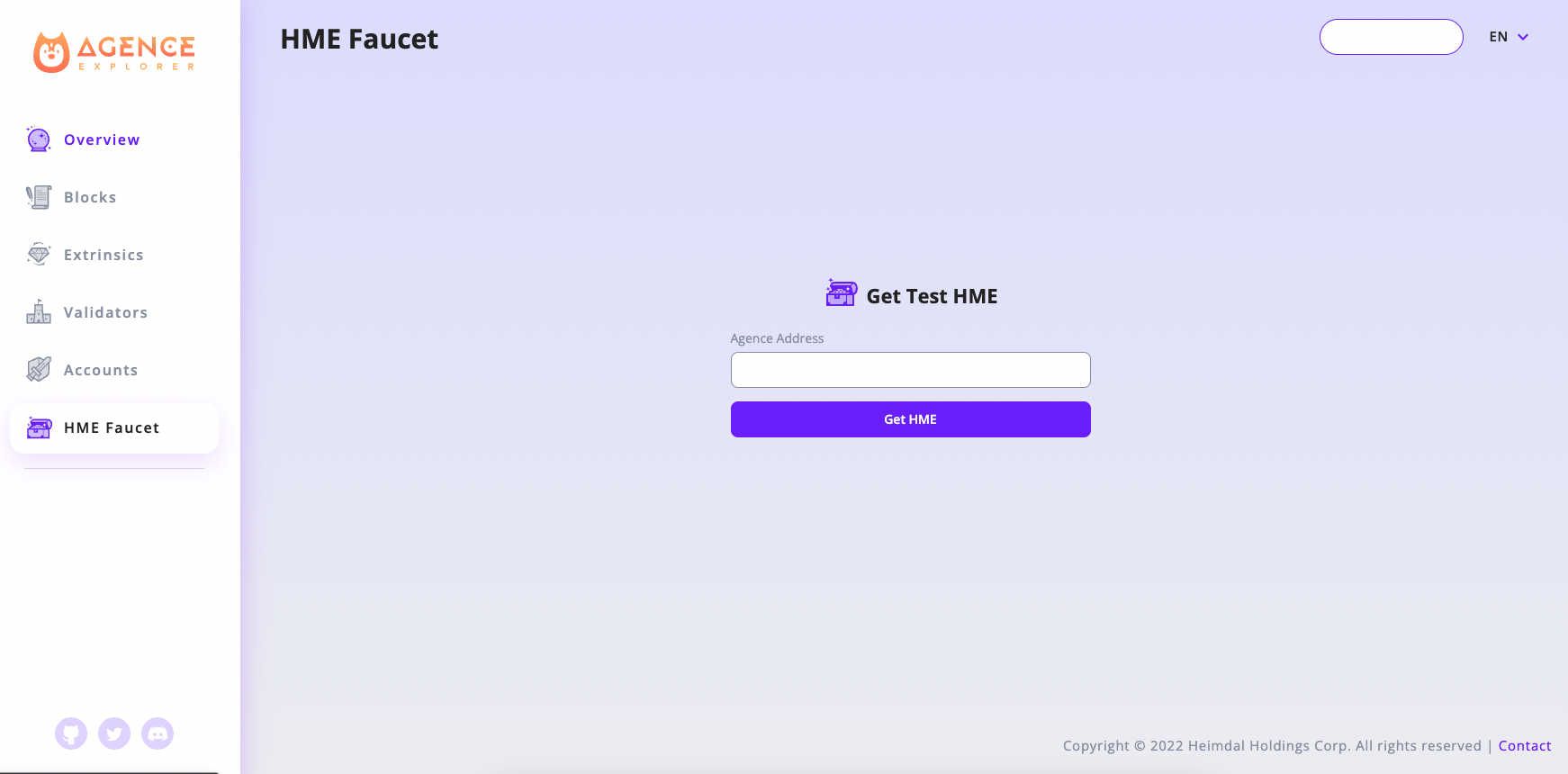
And run the following commands in acmd to bond somes stake to your controller account:
const stash_suri = 'author explain property conduct state jacket ankle orphan cancel pear install blouse/stash'

//Add stash account keypair into keyring
const stash_account = this.keyring.addFromUri(stash_suri, {})

const controller_suri = 'author explain property conduct state jacket ankle orphan cancel pear install blouse/controller'

//Add controller account keypair into keyring
const controller_account = this.keyring.addFromUri(controller_suri, {})

//Check stash account's balance
(await api.query.system.account(stash_account.address)).toHuman()

// To make sure controller account have enough balance for signing extrinsics and maintaining existential_deposit,
// it's better to transfer more than just the existential_deposit */
const transfer_amount = api.consts.balances.existentialDeposit.toBigInt() * 10n

//Transfer some balance from stash account to controller account
api.tx.balances.transfer(controller_account.address, transfer_amount).signAndSend(stash_account)

//Check controller account's balance
(await api.query.system.account(controller_account.address)).toHuman()

/* The stake fund amount that stash account want to bond to controller account.
The more staking fund your validator have, the higher chance that it will be choosen as active validator */
const stake_amount = api.consts.balances.existentialDeposit.toBigInt() * 100n

//Bond some stake to your controller account
api.tx.staking.bond(controller_account.address, stake_amount, 0).signAndSend(stash_account)
Step 5: Set session keys
To associate the controller account(we made in Step 4) with our validator node, we need to submit an extrinsic in acmd to set session keys.
// The corresponding Ids from Step 3
const grandpaId = api.createType("AccountId", '5CVHtaBHvM2GxEMq6ynbBdqWvCub7nFm7532Yd4Wofp1anuf')
const babeId = api.createType("AccountId", '5GhHQqqfLUR2zFb6Esrdf8Pf1PhfRJDd6Zzb6wXicrV1WgXd')
const imOnlineId = api.createType("AccountId", '5GhHQqqfLUR2zFb6Esrdf8Pf1PhfRJDd6Zzb6wXicrV1WgXd')
const authorityDiscoveryId = api.createType("AccountId", '5GhHQqqfLUR2zFb6Esrdf8Pf1PhfRJDd6Zzb6wXicrV1WgXd')

await api.tx.session.setKeys([grandpaId, babeId, imOnlineId, authorityDiscoveryId], new Uint8Array()).signAndSend(controller_account, (result) => {console.log(JSON.stringify(result))})
Step 6: Validate
Finally, we need to submit a validate extrinsic in acmd to tell testnet that we want to participate as a validator.
await api.tx.staking.validate({"commission": 0}).signAndSend(controller_account, (result) => {console.log(JSON.stringify(result))})
Claiming Rewards
After each era, rewards are paid to validators and nominators, but require executing an extrinsic to receive them.
/* The era number that your validator has earned reward.
You can check rewarded eras in https://explorer.takecopter.agence.network/validators/{stash_account_address} */
const rewardEra = 546

//Claim your reward as validator
await api.tx.staking.payoutStakers(stash_account.address, rewardEra).signAndSend(controller_account, result => {console.log(JSON.stringify(result))})
Stop validating
To stop validating, you must first declare no desire to validate with the chill extrinsic.
await api.tx.staking.chill().signAndSend(controller_account, (result) => {console.log(JSON.stringify(result))})
Your validator will become inactive in next era, then you can gracefully shut down your agence node by ctrl + c.
After it becomes inactive in the next era, if you plan to not only shutdown your node but also unbond your funds or claim rewards, you should do the following actions after submitting chill extrinsic:
//Purge session keys
await api.tx.session.purgeKeys().signAndSend(controller_account, (result) => {console.log(JSON.stringify(result))})

const unbond_amount = (await api.query.system.account(stash_account.address)).data.feeFrozen

//Unbond your funds from controller
await api.tx.staking.unbond(unbond_amount).signAndSend(controller_account, result => {console.log(JSON.stringify(result))})